Skip to content

Private beta — accounts opening in small batches

Know your runway before anyone asks.

JuniFi is the AI CFO for people who work for themselves: founders, freelancers, contractors and creators. It keeps business and personal money separate down to the transaction, reconciles bills and tax set-asides against your ledger, ages your receivables and drafts the follow-up, and attaches a stated confidence to every runway figure, naming the gaps in its data.

Your email is used to tell you when your account is open, and for nothing else. No card, no bank connection, no newsletter.

Read-only bank connections through Plaid.No card.No sales call.See the productSign in

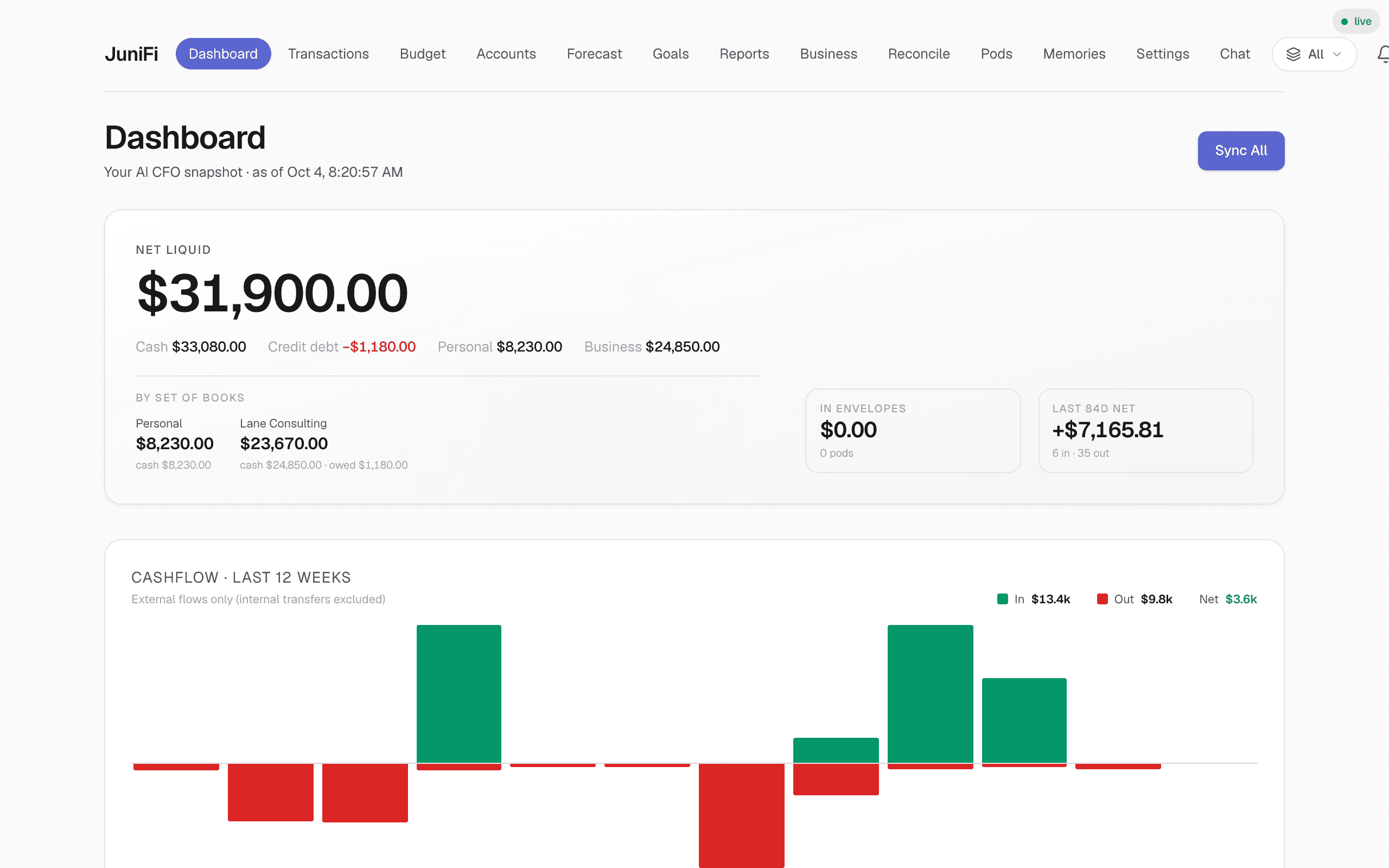
JuniFi dashboard for a demo account: net liquid, the business and personal split, a twelve-week cashflow chart, and declared obligations with their evidence states
Demo account, fictional data. Net liquid, the business and personal split, cashflow, and declared obligations with their evidence states — the real JuniFi dashboard.

Owner-operated finance breaks every tool on the market.

When you are the founder, the contractor or the consultant, you are also the finance department. Every product in the category assumes those are two different people, and gets the arithmetic wrong accordingly.

Personal finance apps file company revenue as a spending category.
Runway becomes a budget line, an owner draw reads as discretionary spend, and the entity disappears from its own numbers.
Business tools want the banking relationship before they show you a figure.
The accounts the money actually moves through are the ones they cannot see — and a partial ledger is worse than an honest gap.
Your accountant reports on a quarter that has already closed.
Draw, hire, defer, chase, set aside: every decision is made weeks before that report exists.
Every AI finance tool projects the same confidence.
A forecast built on nine current accounts and one built on two that stopped syncing should not read identically. On most tools they do.

Five things you stop doing by hand.

The work a CFO would take off your desk, in the order you would meet it. Each figure below is drawn from the screen it represents.

Keep the business and the owner separate.

Each account is assigned to an entity as you connect it, and every transaction carries its own scope on top of that. The client dinner on a personal card books to the company without dragging household spending with it. Business spend that is really personal gets flagged and reclassified as an owner draw or a reimbursement rather than booked as a business cost — which is the difference between books that survive a review and books that do not.

  • Scope lives on the transaction, not only on the account
  • Commingled spend flagged, then reclassified as a draw or a reimbursement
  • Every total reads three ways: business, owner, consolidated
TransactionsViewing · Business
  • Home Depot

    Oct 2 · Business checking

    -318.47business
  • Costco

    Oct 2 · Personal credit

    -241.09personal
  • Adobe Creative Cloud

    Oct 1 · Personal credit

    -59.99business

    Re-scoped to business · rule saved for this merchant

  • Client retainer · Northwind

    Sep 30 · Business checking

    +4,500.00business
Illustrative interface. Scope is stored per transaction, so one card can serve more than one entity.

Know which obligations are actually settled.

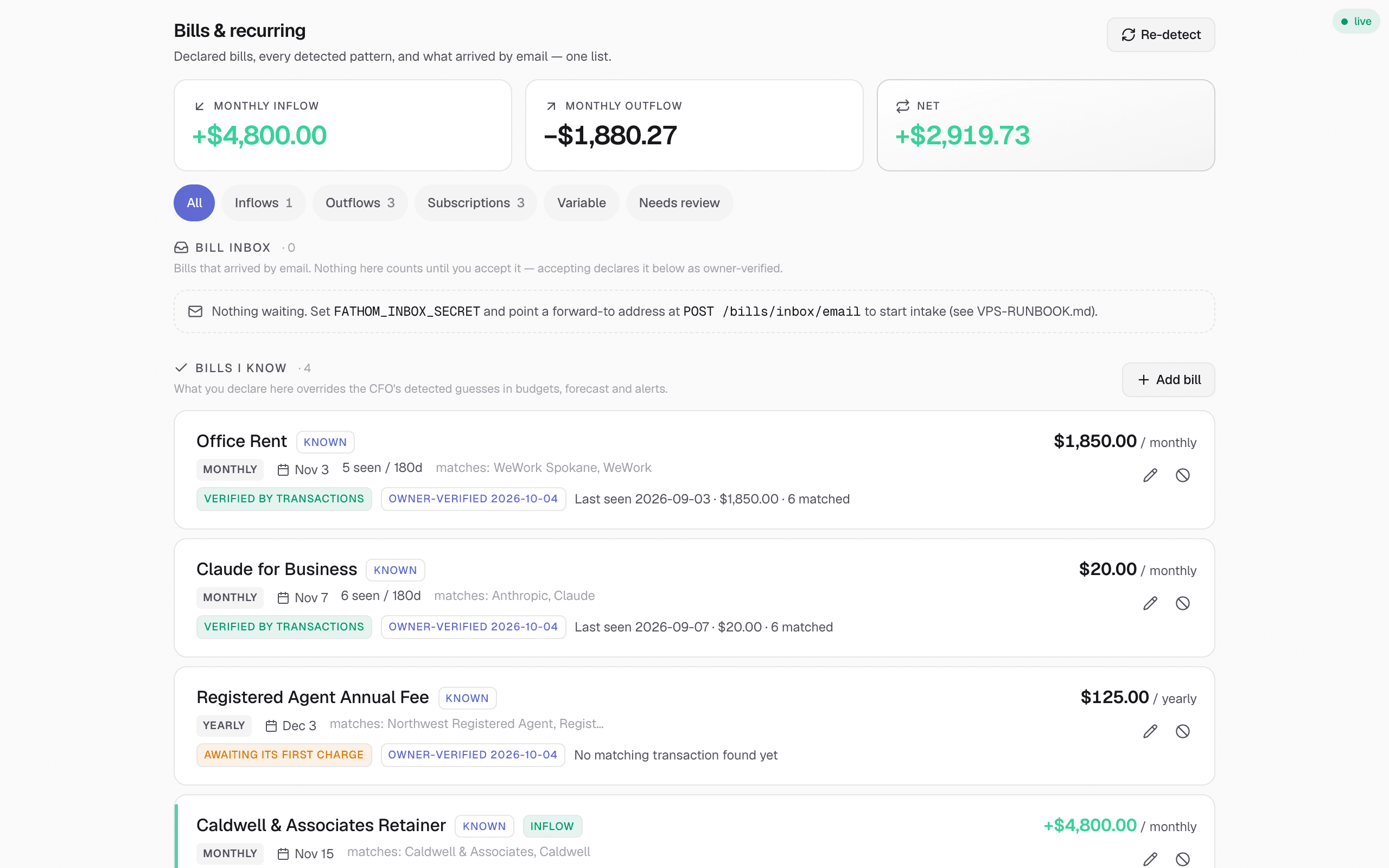
You declare what the business owes — rent, loans, subscriptions, the quarterly tax set-aside — and JuniFi reconciles each one against the ledger. Every obligation is labelled by the evidence behind it: matched to a cleared transaction, no evidence yet, or past due and never seen at all. An unmatched obligation still counts against cash, and the record says so rather than assuming the charge went through.

  • Declared amount and matched transaction shown side by side
  • Variable obligations tracked as a range rather than a single figure
  • Nothing is marked settled because a due date passed
JuniFi bills and recurring page for a demo account, showing declared obligations with their evidence states — verified by transactions, or awaiting its first charge
Demo account, fictional data. The evidence states are the ones the application renders.

Collect what you are owed.

Open invoices from your connected business system are bucketed by days late — 0–30, 31–60, 61–90, 90+ — so the ageing is a position you can act on rather than a report you read. For anything genuinely late, JuniFi composes the follow-up at a tone that matches the bucket. It drafts; you send from your own inbox. There is no outbound email capability in the product, by design.

  • Standard ageing buckets, totalled and attributable to a client
  • A reminder drafted per overdue invoice, escalating with the bucket
  • Nothing is ever sent on your behalf — drafts only, then marked sent by you
Receivables · ageing$12,450 open

0–30 days

$7,400

2 invoices

31–60 days

$3,250

1 invoice

61–90 days

$1,800

1 invoice

90+ days

$0

None

INV/2026/0184 · Northwind Ltd$1,800.00
67 days lateReminder draftedTone · final

Subject: Overdue invoice INV/2026/0184 — $1,800.00
Our records show invoice INV/2026/0184, issued 28 July, remains unpaid 67 days past its due date…

Drafts stay in the app. You copy the text, send it from your own inbox, then mark it sent.

Illustrative interface. Sample figures; the buckets and the draft-only workflow are the real ones.

Know your runway before anyone asks.

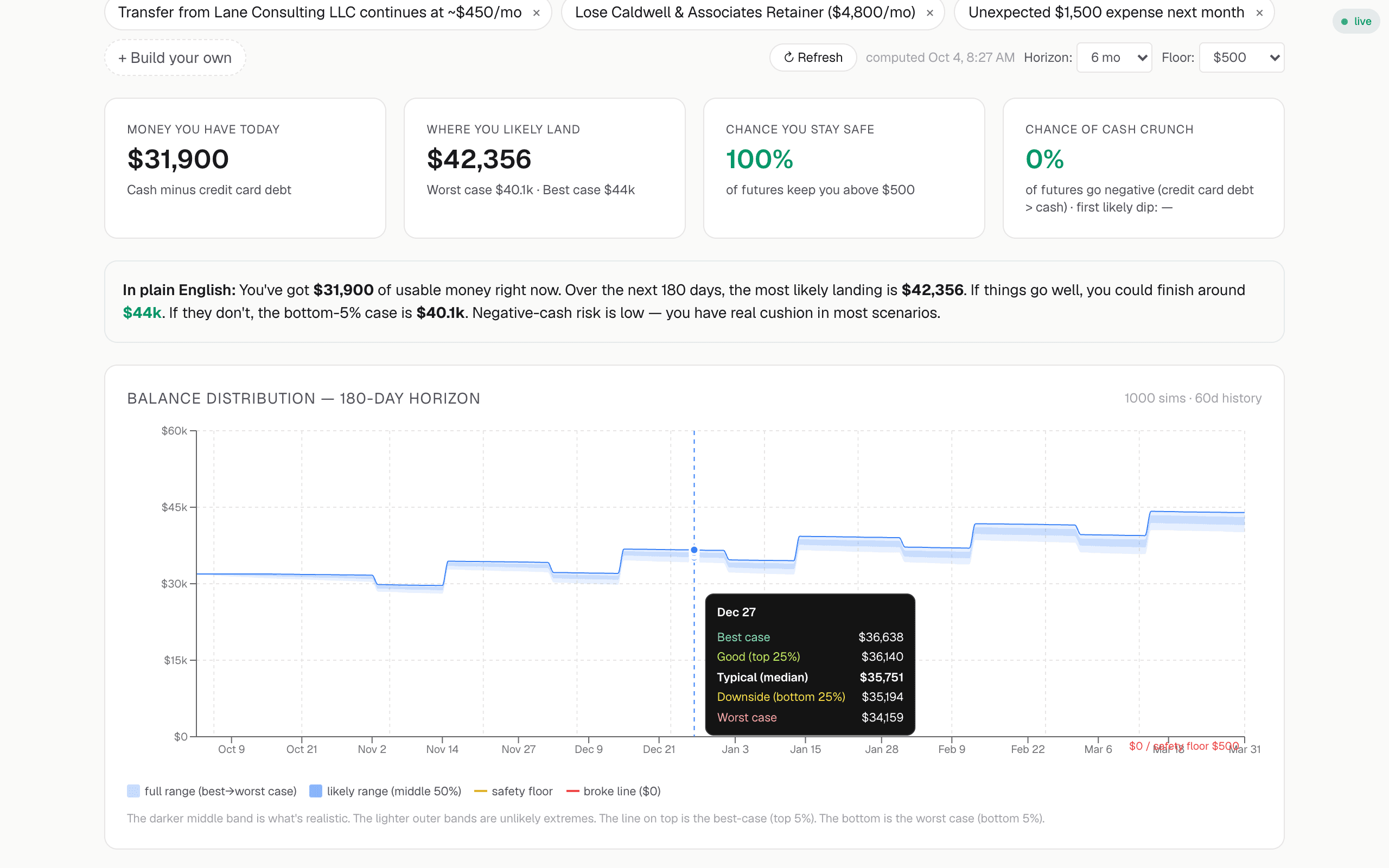
Cash forecasts run as Monte Carlo simulations, so the answer is a distribution rather than a single number: a pessimistic edge, a median and an optimistic edge across the next ninety days. Each run reports its own confidence and the reason for it — which accounts are stale, which recurring charges remain undeclared, and roughly what that uncertainty is worth in dollars.

  • p10, p50 and p90 cash positions over ninety days
  • Named data gaps attached to every run, not a generic disclaimer
  • Declared obligations and detected recurring charges both feed it
JuniFi cashflow forecast for a demo account: the Monte Carlo balance-distribution fan chart over a 180-day horizon, with best, typical and worst-case figures and a plain-English interpretation
Demo account, fictional data. The confidence note is the real shape of the output.

Brief it once. It holds the context.

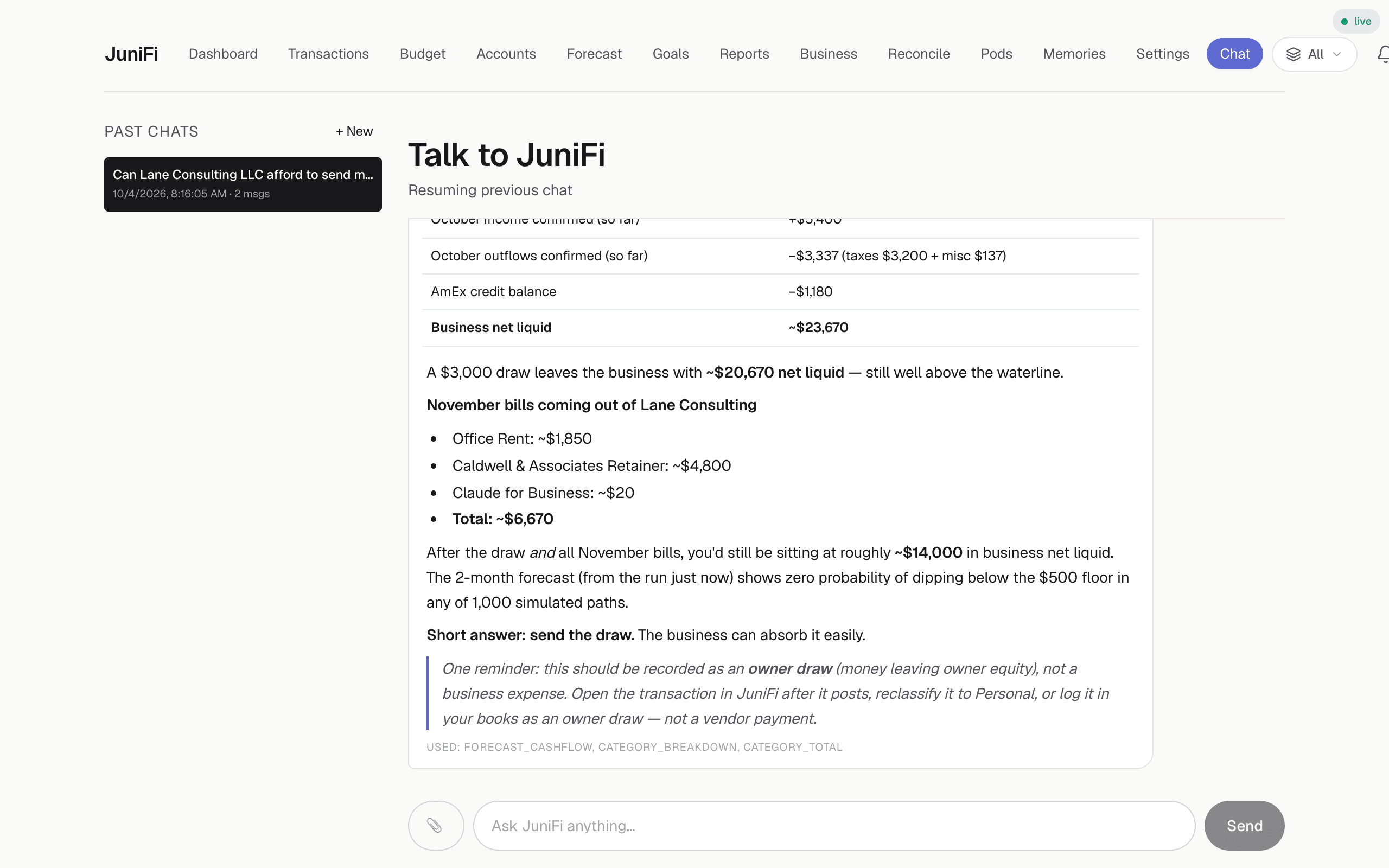
JuniFi keeps a versioned memory of the facts that govern your decisions: the cash floor you will not go under, the tax set-aside you hold, the client who pays thirty days late every time. Ask it a question and it answers against your actual figures plus those facts, shows the arithmetic it used, and names what it could not see. It also writes a monthly narrative whether you ask for one or not.

  • Versioned memory you can read, correct and roll back
  • Answers cite the figures and the remembered facts behind them
  • Monthly written report, plus the thresholds you set yourself
A conversation with JuniFi's AI CFO for a demo account, answering whether the business can afford a $3,000 owner draw by citing real account balances, declared bills and the forecast
Demo account, fictional data — a real conversation with JuniFi’s CFO.

Keep your books where they are.

JuniFi began hard-wired to a single Odoo instance. That was a defect, not a feature, and it is fixed.

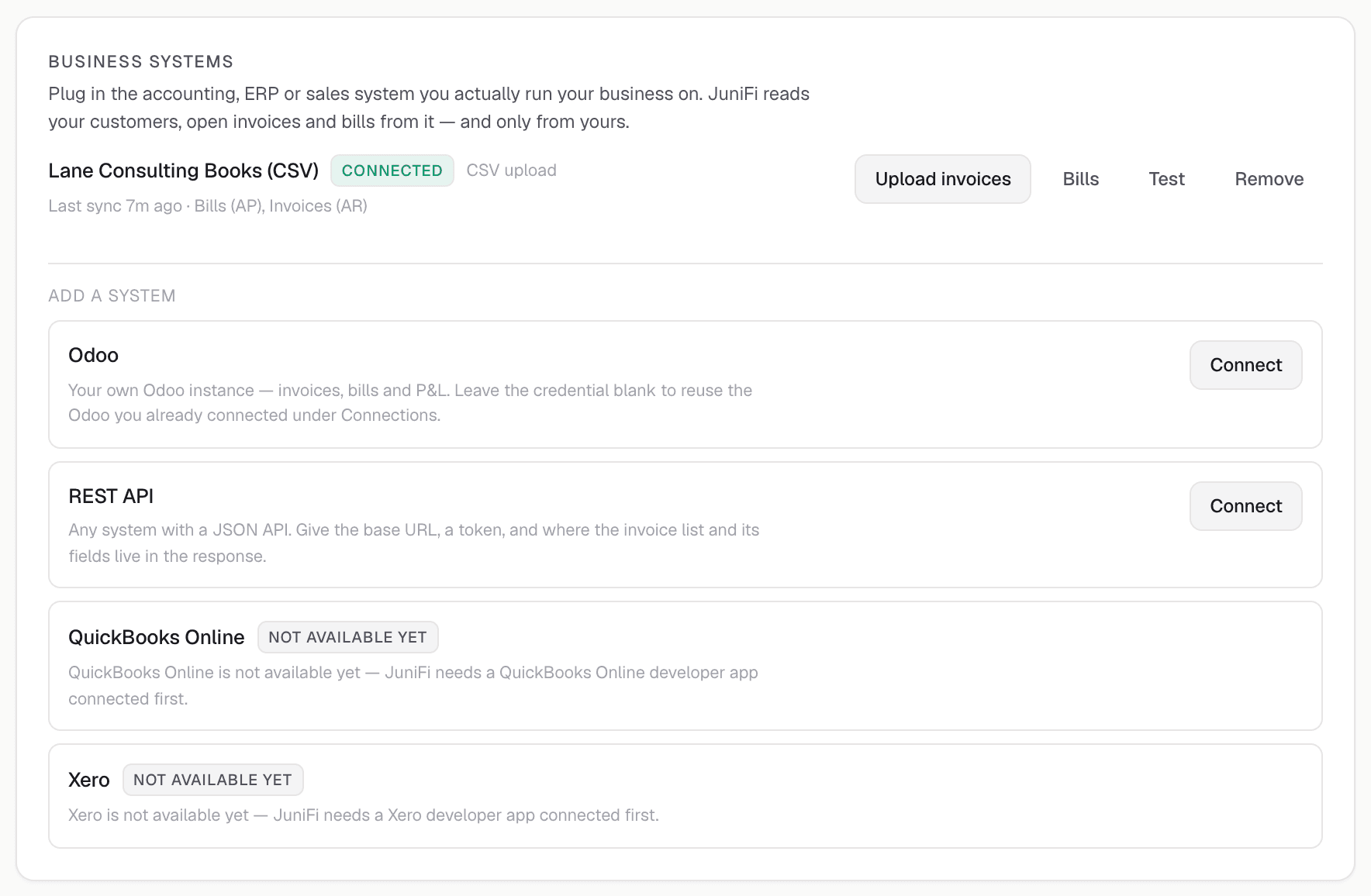
Bank data arrives through Plaid. Business data arrives through a connector — and a connector is nothing more than a documented mapping between your API and JuniFi's own accounts, invoices and obligations. Odoo is live today. QuickBooks, Xero and Stripe are next.

Anything with an HTTP API can be mapped in without touching the rest of the product, which is the point: migrating your ledger should not be the price of admission for a CFO that can read it.

Running something unusual? Say what it is in the early-access form. The connector contract exists so the answer can be “here is the mapping” instead of “move your books.”

JuniFi Settings page, Business systems card, for a demo account: a connected CSV books connection with Invoices (AR) and Bills (AP) capabilities, next to Odoo, a generic REST API, QuickBooks and Xero as systems to add
Demo account, fictional data. Live statuses are accurate as of October 2026. “Next” means in development, not shipped.

What the first hour looks like.

  1. 01

    Connect the accounts

    Plaid, read-only, a few minutes. Each account is assigned to an entity — the company or the owner — as it arrives.

  2. 02

    Declare the obligations

    Rent, loans, the quarterly tax set-aside, the subscriptions you mean to keep. JuniFi reconciles them against the ledger from there.

  3. 03

    Put a real decision to it

    "Can the company pay me $3,000 in November?" You get the figure, the arithmetic behind it, and what it could not see.

What we do not claim yet.

JuniFi is early. The convention is to cover that with a logo wall and a round number. Here is the actual position instead — you can judge the product on what it does.

A customer count.
JuniFi has run one company’s finances for months and is only now opening to other accounts. There is no figure worth publishing, so there is not one on this page.
Testimonials or logos.
There are none here because there are no other users yet. When there are, they will carry a name, a role and specifics you can verify.
A SOC 2 report.
We do not hold one and are not in an audit window. The security page states exactly which controls are in place, which are in progress, and which are absent.
That it replaces your accountant.
It does not. It removes the part of the engagement that is assembling and checking numbers, and leaves the judgment you are actually paying for.

It can read your money. It cannot move it.

JuniFi asks for read access to every account you own. That deserves specifics and a list of what is missing, not a padlock icon.

Read-only by construction
Bank connections are created through Plaid in read-only mode. JuniFi cannot move money, settle a bill, or open an account — the capability is not built, not merely disabled.
Credentials never reach us
Your bank login is entered inside Plaid’s own flow. JuniFi receives a scoped access token, never a username or password.
Records are owned, not shared
Every financial row carries the user it belongs to. Hardening that into enforced multi-user isolation is the work in flight, and no second account opens until it is finished.
Sessions are signed, and they expire
Sign-in sets a signed, HttpOnly cookie with a fixed lifetime. Passkey and authenticator sign-in are being wired up alongside multi-user accounts; today they are not available.

Free during the beta. $29 a month at launch.

One plan, one price. Not metered by accounts connected, not discounted for committing to a year you have not yet tried.

Early accessFree
Advisor, at launch$29 / month

Early access is free for the whole beta. You are told the price and asked to agree before anything is ever charged — no account converts to paid by default.

Questions we are asked.

Who is JuniFi for?

People who work for themselves: founders, freelancers, contractors and creators — a founder operating between rounds, a freelancer with irregular invoices, a contractor carrying retainers and quarterly tax obligations, a creator with platform payouts and sponsorship income. If the company you own and the household you fund both draw on accounts that overlap, that is the situation it was built to hold.

How does JuniFi connect to my bank?

Through Plaid, read-only. JuniFi can see balances and transactions. It cannot move money, open accounts, or make payments on your behalf, and your bank credentials are entered at Plaid and never reach us.

How does it keep the business and the owner separate?

Each account is assigned to an entity when you connect it, and every transaction carries its own scope on top of that. A personal card can therefore carry a business expense without distorting household spending, and business spend that is really personal is flagged and reclassified as an owner draw or a reimbursement rather than booked as a business cost. Balances, budgets, forecasts and reports read for the business alone, the owner alone, or consolidated.

Which business systems can JuniFi read?

Odoo is live today over JSON-RPC, as is Sequence for income routing. QuickBooks, Xero and Stripe are the next connectors. Beyond those, any system with an HTTP API can be mapped in against a documented connector contract — JuniFi is not hard-wired to one ERP, and it does not ask you to migrate your books.

What does the AI CFO actually do?

It keeps a versioned memory of the facts about your business, reconciles the obligations you declare against the transactions it can find, runs Monte Carlo cash forecasts and states the confidence behind each one, ages your receivables and composes the follow-up, watches the thresholds you set, and writes a monthly narrative. Where the underlying data is incomplete it names the gap instead of projecting confidence it has not earned.

Does it email my clients on my behalf?

No. JuniFi buckets open invoices by days late and composes a reminder per invoice, and that is where it stops. The text sits in the app for you to copy and send from your own inbox; nothing leaves the product. There is no outbound email capability in it.

Is JuniFi tax or investment advice?

No. JuniFi is software. It will organise your numbers, show you what it can see, and name what it cannot — but it is not a CPA, not a licensed adviser, and not a substitute for either.

What does it cost?

Nothing during the private beta. At launch the Advisor plan is 29 US dollars per month. Early-access accounts are told the price before anything is ever charged.

Can I get my data out?

Yes. Transactions, accounts, declared obligations and reports export as CSV and JSON, and account deletion removes the stored financial data along with the Plaid connections behind it.

Request an account.

Accounts open in small batches while the multi-user work lands. Tell us what you run and you will get one email when yours is ready.


Already have an account? Sign in

JuniFi — the AI CFO for people who work for themselves